You don't need a Macbook to do applied AI engineering
Today when i opened my VS code to work, it took 3min for my terminal to open and VS Code kept crashing. My Codex setup (i use the plugin on vs code) crashed multiple times too. At that point, i knew a maintenance session is due. So i started tuning my WSL setup because the machine was beginning to feel heavier than it should.
During this session, i used claude code to debug from my root (~) on WSL. Claude told me the PC had only 8GB of RAM. This is wrong, my machine has 16GB of DDR4 RAM single slot. I have spent most of my life repairing, upgrading, swapping and managing PCs, so i know a bit of what sort of hardware i'm running.
The reason Claude was wrong was because it was looking at the wrong layer. It was checking Ubuntu (which is mounted on WSL) with free -h which said that i had 7.7 GiB of memory from inside Ubuntu. BTW, WSL (Windows subsystem for linux) runs linux in a lightweight virtual machine on top of windows.
I'm making this point because this summarizes my dev setup and usage: It works well, but only if you know which layer you are asking questions from.
By the way, this whole story is happening on a Windows + WSL machine. Not a Mac. I'll come back to the 8GB thing when i show what i changed in .wslconfig later.
What i do for work
My work is in applied AI engineering. Basically, i'm not training foundational models or running any GPU clusters (that's what ML/AI engineers do). What i do is more messy, i build systems that collect context, search it, extract useful meaning from it and show it back to users. The complete end to end process.
Right now, i do that work at Sift. Sift turns workplace and development content into decision memory. It ingests sources like Slack, Github PRs, comments, commits and Claude Code sessions. It extracts decisions with citations, writes them into a graph, and exposes traces so someone can answer a hard question: why does this code or decision exist?
On a normal day, that means running a frontend, API services, an ingestion service, Neo4j, Postgres, Redis, FastAPI, Vite, Docker Desktop, VS Code, Claude Code, and Codex. Some of it is UI. Some is graph modeling. Some is model routing. A lot of it is debugging why one service believes a user exists and another service does not.
My machine, and why i'm still on Windows + WSL
My machine is a Windows HP EliteBook with an Intel i7-7600U, a 2-core / 4-thread chip from 2017, and 16GB of RAM. This means an old CPU, that runs Docker Desktop on Windows (which has overhead) and a virtualization layer. WSL is amazing but it is still virtualization. This means that files and memory behave differently depending on which side of the Windows/Linux boundary you are on.
However, WSL gives me linux shells, pkg managers, process behavior, and deployment shaped workflows. So yeah that's why i still use it. I can enjoy these things and also use Windows for my non-developer things.
Who this essay is for
This article is for anyone who has been lied to that you need a Mac to do this sort of advanced dev work. In many dev circles, the Mac is treated as the default professional machine, especially near AI, agents, infra or product engineering. Macs are amazing! Apple Silicon is excellent, the battery life, thermals, and Unix-like defaults are parts of the advantages most engineers enjoy.
But better is not the same as REQUIRED! My first PC was a Compaq desktop with 2 GB of RAM and a 128 GB hard drive. I called it Candace. Around 2017, I got a scrap Dell Latitude for about $15 because I needed something for school that could run Visual Basic and QBasic. Later, I used an HP with 8 GB of RAM and a 512 GB hard drive. That was where I got into WSL. So when I say Windows + WSL is viable, I am saying it from years of doing real work on sub-optimal machines.
So how did i optimize my setup today?
Slow shell startup
The first thing i wanted to address was the slow shell startup. I discovered that my .zshrc was loading nvm and running pyenv init. So every time a shell opened, i measured it. And the result was: three cold starts at 2.58 seconds, 4.11 seconds, and 11.48 seconds respectively.
WOW!! This is P0 fix because VS Code checks the shell environment when it opens terminals, so startup cost is an important part of the code editor experience. To fix this i put the node binary path and pyenv shims directly on PATH, then lazy-loaded all the expensive parts. After this change, cold starts now measures 0.21, 0.31, and 0.32s!!! My terminal now opens in less than half a second!!
WSL itself was crashing
Next point of contention was WSL. Remember at the beginning, i said my VScode instance runs on Ubuntu and it was always crashing. Every hour, i had to reconnect the remote connection and sometimes shutdown WSL to get anything to work again. Worse of all, i couldn't open 2 vscode windows at the same time. This is more tricky than the shell issue so i had to roll my sleeves here and switch to using Codex 5.5 high (i'm sorry opus 4.7, i just had to).
So before now, i did not have a .wslconfig file on the windows side. This means that WSL was using all the default configurations. On a 16GB machine, this means WSL exposes 50% of the host memory. This is why free -h showed 7.7 GiB earlier. That's issue 1.
Issue 2 is that Docker Desktop. On Windows, it runs its own WSL distro called docker-desktop, which is separate from the Ubuntu distro i log into for my daily work. So basically, the Docker daemon i talk to from Ubuntu is not really inside Ubuntu. It lives next to it in a different environment but in the same host. Interesting. It's important to note that container data also lives in a virtual disk file called a VHDX. In my case, Docker's docker_data.vhdx had grown to around 115 GB. That was mostly maintenance debt: old images, old layers, and deleted Linux-side data that had not been released cleanly back to Windows.
A quick detour: what is a VHDX?
A VHDX is a virtual hard disk file. WSL and Docker use it to store Linux filesystem data on Windows. By default WSL doesn't have sparse mode activated. So, you see without sparse behavior, that file keeps growing as Linux uses space and it won't shrink automatically when files are deleted inside Linux.
Enabling sparse mode
Great, now to fix the issues, i had to find a way to enable sparse mode. From admin PowerShell with Docker Desktop quit:
wsl --shutdown
wsl --manage Ubuntu --set-sparse true --allow-unsafe
wsl --manage docker-desktop --set-sparse true --allow-unsafe
fsutil sparse setflag "C:\Users\<you>\AppData\Local\Docker\wsl\disk\docker_data.vhdx"
The first three lines mark the registered WSL distros as sparse. The last line handles docker_data.vhdx directly, because Docker's data disk is attached to the docker-desktop distro at runtime and is not a registered WSL distro that wsl --manage can target.
Now, when Linux frees disk blocks inside the virtual disk, Windows can punch holes in the VHDX file and reclaim the space. A disk block is the smallest unit of storage a filesystem tracks, usually 4KB on Linux. In plain english: the disk file gets a way to give unused space back. Awesome!
Sparse VHDX has a new tool: Optimize-VHD
But there's one catch. In the past, when i want to free disk space, i used this old windows command diskpart compact vdisk. This doesn't work with sparse VHDX files. So i had to install the Hyper-V PowerShell module to get the new tool Optimize-VHD which understands sparse files. From admin PowerShell:
Enable-WindowsOptionalFeature -Online -FeatureName Microsoft-Hyper-V-Management-PowerShell -All -NoRestart
Then restart Windows so the binaries actually deploy.
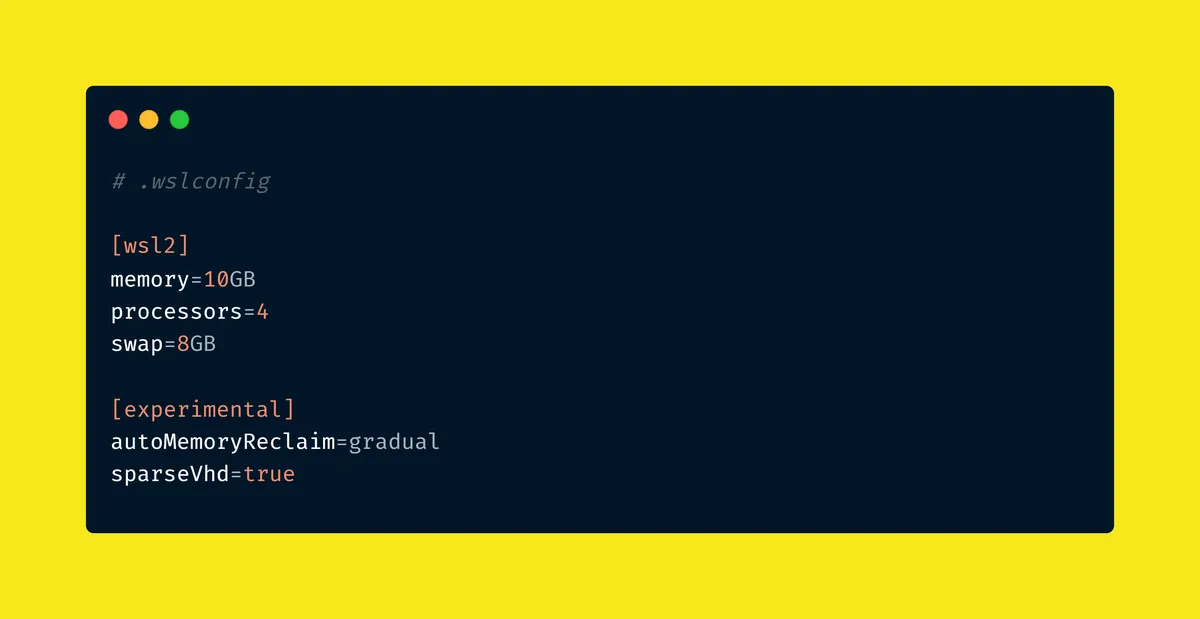
My final .wslconfig
At this point i've been able to docker prune and enable sparse mode. My WSL is lighter, i have more space on my Windows instance and my Linux memory can auto shrink.
next, i had to create a .wslconfig file that says what i want my machine to do:
[wsl2]
memory=10GB
processors=4
swap=8GB

[experimental]
autoMemoryReclaim=gradual
sparseVhd=true
This is resource provisioning. I just gave WSL enough memory to run my workload, leave windows enough room to breathe, give memory spikes somewhere to go with swap and allow WSL to return unused memory gradually.
Whoop! Whoop! Whoop! My dev workstation is usable again!
What do these constraints teach me?
So i always need to ask myself these questions when experiencing issues with my setup:
- How much memory does this process need?
- Which VM owns this service?
- Is this file large logically, physically or both?
- Is the shell slow because the terminal is bad, or because startup scripts are doing unnecessary work?
Clearly no Mac user has to ask themselves these questions. Things are smoother over there. The only honest answer to these questions is: this would be better and faster on more suitable hardware.
Most applied AI engineering isn't blocked by this
Anyhoo, back to the title of this article, most applied AI engineering work is not blocked by these constraints. If your work is retrieval, embeddings, LLM calls, API design, graph storage, background jobs, product surfaces, ingestion pipelines and dev tooling, Windows with WSL can carry a lot of it. You don't need the most optimal setup to start with.
However, i hope that i will soon be able to afford a Macbook tho. Till then, WSL!